Schedule the visit and assign the team
Choose a time based on team availability, then assign the lead groomer and any assistants needed.

Schedule appointments and groomers, keep notes and photos for every pet, then check out. Commission follows the groomers who actually did the work.
The day view shows the time, pet, service, customer, and payment status; appointments without a groomer are easy to spot.
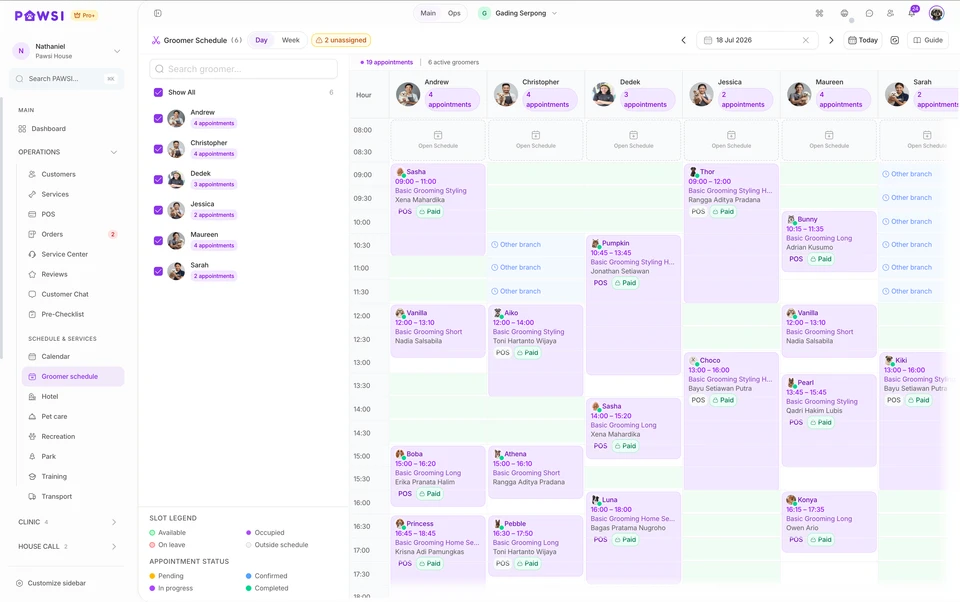
Choose a time based on team availability, then assign the lead groomer and any assistants needed.
Review the service and care notes, upload before-and-after photos, then update the visit status.
Apply packages or discounts, record payment, then review groomer commissions.
Set duration and pricing by pet size, together with add-ons, packages, bundles, and seasonal pricing.
Drag an appointment to another time or groomer without re-entering the pet and service details.
Use flexible 30-minute intervals or fixed slots. Set working hours, leave, and holidays, then block time directly on the calendar when a groomer is unavailable.
Save grooming results and reuse reference photos on the pet’s next visit.
Use percentage or fixed rates, including rates by pet size. When a service is completed by a team, commission can be split between the lead groomer and up to two assistants.
Set access by staff role; attendance and checklists depend on the plan and configuration.
The PAWSI team can help map your services, schedule, groomer assignments, and checkout process before setting up the account.
Availability depends on your plan, enabled modules, configuration and permissions.
One service can record a lead groomer and up to two assistants. Commission is split by the sharing rules you configure and can be exported to a spreadsheet.
Use flexible 30-minute scheduling or fixed slots, with working hours, leave, holidays and direct calendar blocks.
Yes. Each visit can store before and after photos, and reference photos from earlier visits can be reused.
Yes, through the PAWSI customer portal. It is included in Pro Plus and must be configured for your business.
Professional is Rp388.000 per month per branch and Pro Plus is Rp888.000 per month per branch.
Professional, Pro Plus and the Home Grooming package include a 7-day free trial. After a basic business verification and a demo session, the trial starts on an agreed date. No card or advance payment is needed, and it never converts automatically.