Schedule the visit and assign the team
Choose a time based on team availability, then assign the lead groomer and any assistants needed.

Explore connected workflows for pet-care operators, retail shops, multi-branch businesses, and the brands that supply them.
Schedule appointments and groomers, keep care notes, track each pet’s status, then complete checkout and review commissions in PAWSI.
The day view shows the time, pet, service, customer, and payment status; appointments without a groomer are easy to spot.
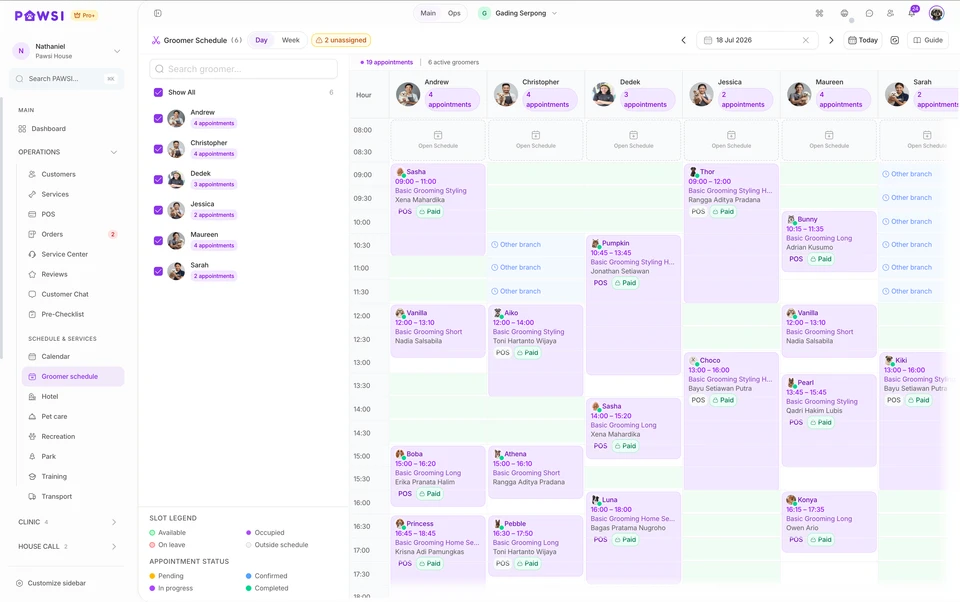
Choose a time based on team availability, then assign the lead groomer and any assistants needed.
Review the service and care notes, upload before-and-after photos, then update the visit status.
Apply packages or discounts, record payment, then review groomer commissions.
Set duration and pricing by pet size, together with add-ons, packages, bundles, and seasonal pricing.
Drag an appointment to another time or groomer without re-entering the pet and service details.
Use flexible 30-minute intervals or fixed slots. Set working hours, leave, and holidays, then block time directly on the calendar when a groomer is unavailable.
Save grooming results and reuse reference photos on the pet’s next visit.
Use percentage or fixed rates, including rates by pet size. When a service is completed by a team, commission can be split between the lead groomer and up to two assistants.
Set access by staff role; attendance and checklists depend on the plan and configuration.
The PAWSI team can help map your services, schedule, groomer assignments, and checkout process before setting up the account.
Availability depends on your plan, enabled modules, configuration and permissions.
See room availability, check-in and checkout schedules, care tasks, and charges for hotel and daycare visits.
The occupancy board shows every room’s status and current stay. Staff can open a booking to check a pet in or out, or add charges.
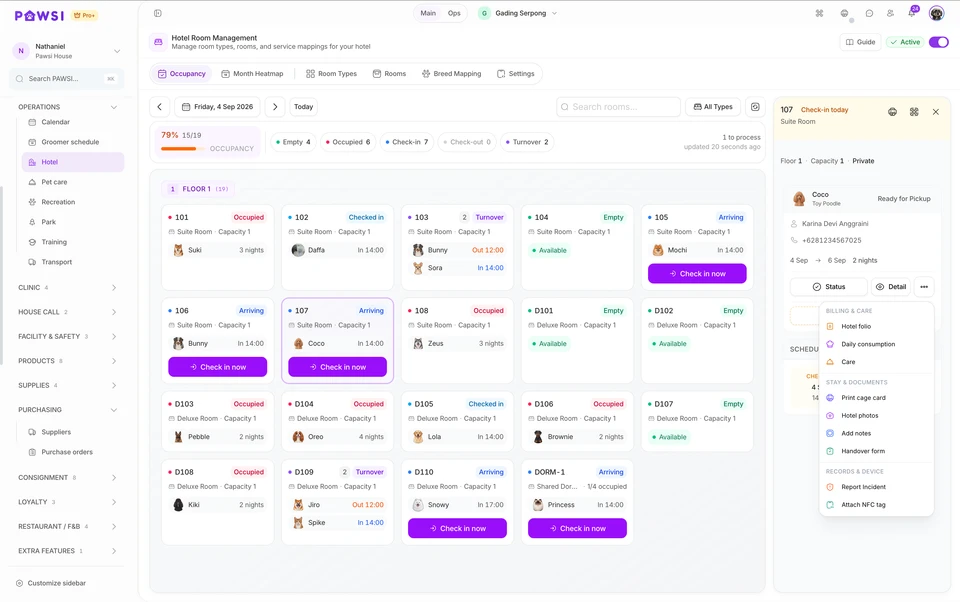
Choose the dates and room for a hotel stay, or set the duration of a daycare visit.
Follow the feeding, activity, medication, and check instructions for the pet’s stay.
Add services or products during the stay, review the bill, then complete checkout.
Manage room types, capacity, facilities, and status, then use the monthly map to see available dates.
Prepare and complete feeding, activity, medication, night-check, and other care tasks for each pet.
Use Open Bill to record products and additional services, then review all charges before checkout.
Set daily, weekly, two-week, and monthly rates for each pet-size tier.
PAWSI checks room conflicts and shows the updated total before the extension is saved.
Move all or part of a stay after reviewing room availability and the relocation period.
Assign an NFC tag to the pet at check-in and detach it automatically at checkout. Available on Pro Plus.
Set visit duration and hours, then review any charge adjustment when a customer picks up late.
The PAWSI team can help map room types, capacity, check-in, care tasks, and checkout before setting up the account.
Daily care and hotel open bills are included in Professional and Pro Plus.
Order from suppliers, receive stock by batch, serve customers at checkout, then track remaining stock and expiry dates in PAWSI.
Checkout shows products, available stock, pricing, and discounts in one transaction. Once paid, the sale is recorded and stock is updated.
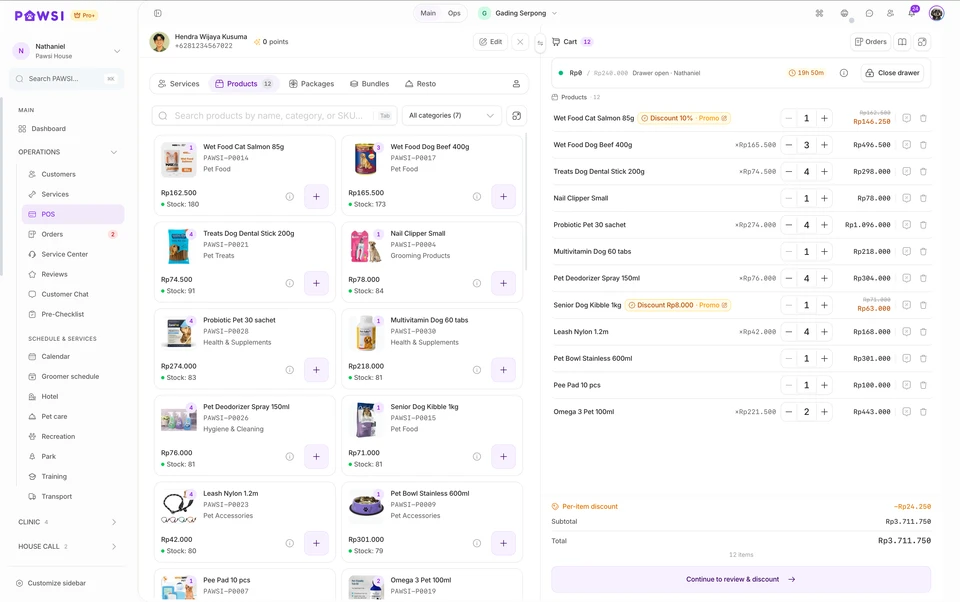
Create a supplier purchase order, then check quantities and batches when the delivery arrives.
Add products by barcode, review discounts, take payment, and send or print the receipt.
Review remaining stock, batches nearing expiry, and movement history before ordering again.
Store each product’s SKU, barcode, selling price, cost, photo, category, and minimum stock level.
Set the minimum quantity and unit price for each tier. Wholesale pricing applies automatically when the purchase quantity qualifies.
Place orders with suppliers, then record full or partial receipts based on what actually arrives.
See the received date, expiry date, remaining quantity, and cost of every batch for the same product.
Use the automatic earliest-expiry order, or move a batch that must be used first. PAWSI records the reason and warns when the order departs from FEFO.
Review products that are low in stock, nearing expiry, or already expired, including the affected quantity and supplier.
See stock moving in and out through sales, purchasing, returns, adjustments, and branch transfers.
Run a full or partial stocktake, record reasons for differences, then update stock records after review.
Open the original transaction, issue the refund, then decide whether the item returns to stock or is recorded as damaged.
Separate received goods from paid bills, then record instalment payments and the remaining purchase-order balance.
PAWSI keeps products, batches, ownership, and payout terms linked to the original supplier—even when the products are sold through the same checkout.
Set the effective period and default model: the supplier receives a base price while the store takes the markup, or the store earns a commission on the selling price.
Record the quantity, base price, and expiry date for every batch. Products remain identified as supplier-owned.
When a product sells, PAWSI links the sale to its supplier, batch, and applicable commission or markup terms.
Pull sales by supplier for a period, review the store’s share and amount due, then record payment or a dispute.
Base price and commission can follow the active agreement or be adjusted for a specific batch so settlement uses the correct terms.
Return products to the supplier or transfer consigned stock between branches without converting it into store-owned inventory.
Consignment is available as a Professional add-on and included with Pro Plus.
The PAWSI team can help map your catalogue, suppliers, purchasing, receiving, checkout, and stock control before setting up the account.
Availability depends on your plan, enabled modules, configuration and permissions.
For pet distributors and brands that buy stock, take consignment stock from suppliers and place products with partner pet shops. PAWSI records who owns each product, what was sent to each partner, what is still on their shelves and what they owe from sales.
The label carries through to shipments, partner stock and sales reports. When a partner's report is verified, PAWSI separates the supplier's share from your earnings, so nothing needs to be reworked in a spreadsheet.
Purchase orders and consignment deliveries received at Main warehouse
 120
120 802 products · 200 units
 40
40 602 products · 100 units
Pumpkin Biscuits 200 gSNK-PMK-200Business-owned96Cat Litter 10 LLTR-CAT-10Business-owned68Carrier Bag MediumBAG-CARRIER-MSupplier-owned32Cat Teaser WandTOY-TEASER-01Supplier-owned48Warehouse staff record receipts and shipments. Admin or finance staff invoice partners and pay suppliers from the same reports.
Goods from a purchase order become business-owned. Consignment goods remain supplier-owned until they sell.
Create a shipment, confirm what the partner received, then verify their sales report each period.
Each product is marked as business-owned or supplier-owned. Business-owned products are added to the supplier bill on receipt; consignment products are paid for only after they sell. Their stock, inventory value and reports stay separate.
Print a Delivery Order for each shipment and attach photos or delivery documents. When goods arrive, record received and damaged quantities. Partner stock increases only by the units received; damaged units go to inspection.
See available stock, goods in transit and goods on their way back for each product at each partner. Filter by partner or SKU, then export to Excel.
Request a pull-back for slow-moving or near-expiry products. Good units return to their original batch. Damaged units are inspected before being restocked or written off.
Set a reporting period for each partner: weekly, fortnightly or monthly. Once a report is verified, PAWSI creates an invoice with a due date. Partial payments are recorded, and each partner's outstanding balance appears in one list.
When a partner sells a supplier-owned consignment product, the supplier's share is added to that supplier's report automatically. Partner collections and supplier payouts are still recorded separately. This flow is enabled with the PAWSI team during onboarding.
PAWSI supports purchasing, consignment in and consignment out as described on this page. If you need route sales, EDI, marketplace distribution or manufacturing, contact our team so we can assess those requirements first.
Before your team starts, we can set up partner pricing, sales-report periods and invoicing to match your agreements.
Core retail workflows are available in Professional. Outbound consignment and advanced supplier reporting are a Professional add-on and included in Pro Plus.
For businesses that sell products while also running grooming, boarding, daycare, or transport. PAWSI connects customers, pets, schedules, stock, and payments in one system.
The team adds boarding for Argo and scaling for Max, then places three products and one package in the same cart. Everything is reviewed once before payment.
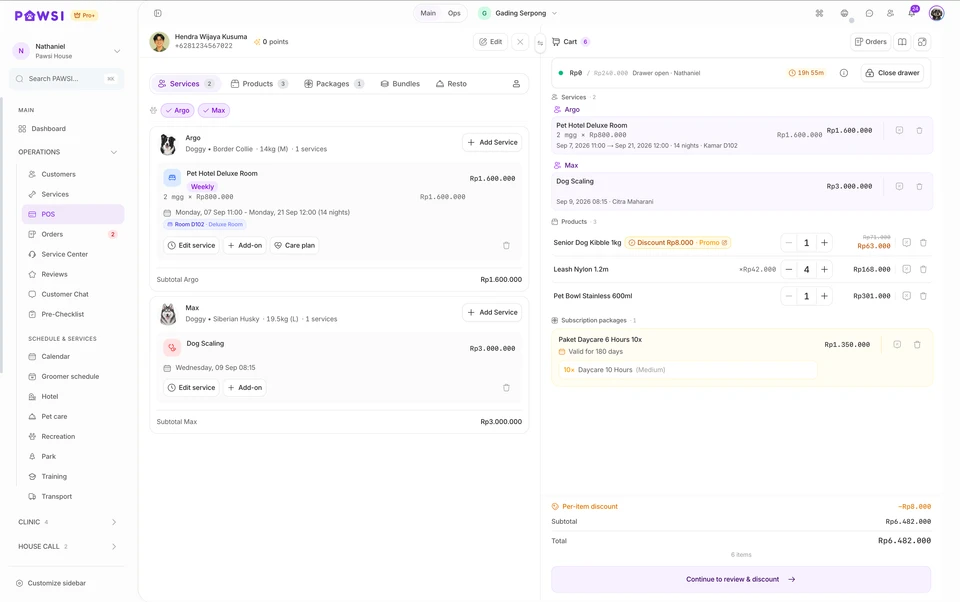
Service teams continue working from their schedules and workspaces. The cashier sees service charges, products, and packages when the customer is ready to pay.
Grooming uses groomer schedules. Boarding uses rooms and stay dates. Daycare and transport retain their own workflows.
The cashier can review services by pet, add products or packages, apply eligible promotions, then continue to payment.
Customer details are stored once, while weight, vaccination, care notes, and history remain attached to each pet.
Add boarding for one pet and grooming for another. Pet names, schedules, staff, rooms, add-ons, and subtotals remain distinct within the cart.
Cashiers can add food, accessories, or service packages without opening another transaction. Items remain grouped for review before payment.
See active transactions, pets needing attention, and bills awaiting payment from the same customer workspace.
Points or service rewards can support customer visits. Per-pet memberships, promotions, vouchers, and customer wallets are available where enabled.
Return to the customer or pet profile to review earlier transactions and services according to staff permissions.
Tell us which services you run. We can organise profiles, schedules, stock, transactions, and team access so they work together in one PAWSI setup.
Availability depends on your plan, enabled modules, configuration and permissions.
Set pickup and drop-off points, calculate the fare, assign a vehicle and driver, then track the trip until the pet arrives.
Choose store to customer, customer to store, or a custom route. Place each stop on the map, then review the distance and total fare in one view.
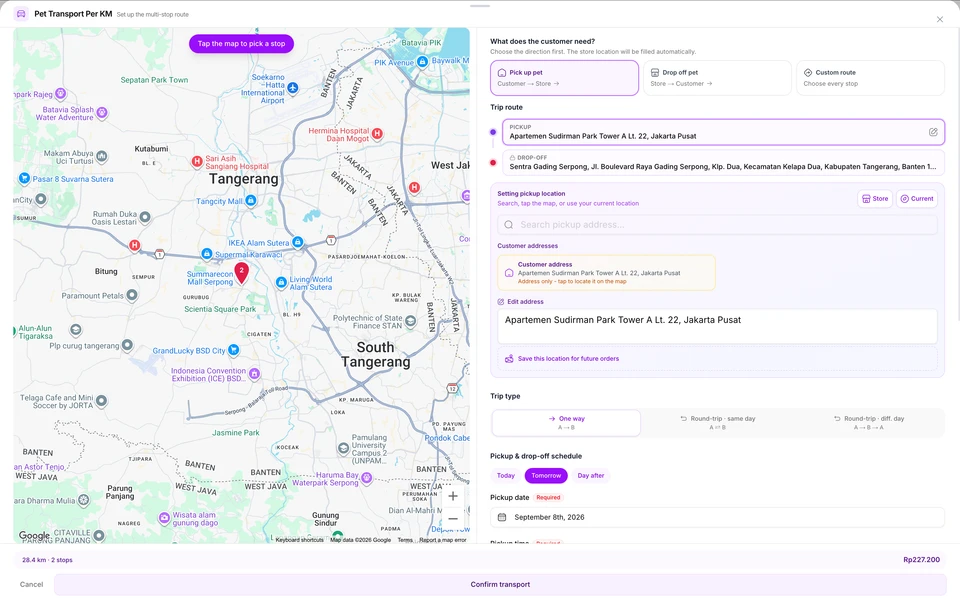
Choose the trip type, pickup and drop-off points, schedule, and applicable fare.
Check the fleet calendar, choose an available vehicle, then assign the driver handling the trip.
Open the assigned address and time, update the trip status, then save photo proof when required.
Use distance-based pricing or a fixed rate per trip. Review the distance and total fare before confirming transport.
Use store to customer, customer to store, or a custom route. Add a same-day or different-day return journey when needed.
Choose a customer address, store location, current position, or a point on the map, then save it for the next order.
View a calendar for each vehicle and every trip so dispatchers can check fleet availability.
Drag a trip to another time or vehicle without recreating its journey details.
Set up regular trips for customers. PAWSI checks scheduling conflicts before creating the recurring series.
Drivers see their assigned pickups and deliveries for the day, together with times and destination details.
Move the trip from scheduled through completion and keep photo proof with the trip record.
The PAWSI team can help map pricing, trip types, vehicles, recurring schedules, and driver responsibilities before setting up the account.
Transport is included in Professional and Pro Plus without an add-on fee.
Prepare visits and teams, issue work orders for field service, then reconcile results, commissions, and payments when reports return.
The route board shows visit order, time, service, address, team members, and payment status, and warns when a route spreads too far.
Keibi · Basic Grooming, Puppy · Premium Grooming
Rumah Alam Sutera · Alam Sutera, Kunciran+62821342342Max · Basic Grooming
Rumah · Gading Serpong, Kelapa Dua081200000004Simba · Basic Grooming
Rumah · Taman Permata Buana, Kembangan081200000006Keibi · Basic Grooming
Rumah 2 · Green Garden, Kedoya Utara+6282122223423PAWSI keeps the information taken into the field connected to the results, commissions, and payments reviewed by the office.
The front desk prepares each visit, the coordinator reviews route assignments, and the team carries the work order as its field reference.
The office receives the work order, compares actual work with the plan, then completes the records and payment review.
View visits by day or week, create recurring series, then reschedule when a customer’s timing changes.
Record the customer, pet, service, address and map pin, schedule, and groomer in one assignment.
The route board groups visits by groomer and flags routes that spread too far or fall outside the operating radius.
Assign multiple groomers to the same visit or adjust the team manually before departure.
Print work orders by route or in bulk so the team carries the customer, service, address, and schedule details.
Upload the returned work order, review timing, services, quality checks, evidence, or a no-show, then finalise the visit.
Record cash or transfer payments, send WhatsApp reminders, then approve or flag problematic transfer proof.
Record preferred or blocked groomers for all of a customer’s pets or for a specific pet.
The PAWSI team can help map service areas, schedules, groomer assignments, work orders, reconciliation, and payments before setting up the account.
Home Grooming is included in Professional and Pro Plus. A specialized Home Grooming package is available for businesses dedicated to mobile service.
Switch branches from the dashboard, control who can access them, and manage sales, stock, schedules, and cash by location.
Give logins only to people who need to open PAWSI. Operational staff can still be recorded with PIN profiles. For stock, every transfer records its origin, destination, quantity, receipt, and returns.
Groomer
Daily records stay separate by location, but owners do not need different systems or accounts to review them.
Branch assignments, roles, and permissions determine the data and actions available to each person.
Owners can check another location, manage teams, move stock, and open reports without leaving PAWSI.
Use the branch picker at the top of PAWSI. The dashboard, POS, stock, schedules, and cash immediately follow the selected branch.
Owners, managers, and selected staff can use login accounts. Cashiers, groomers, and other frontline workers can use PIN-based operational profiles for assignments, attendance, and commissions.
Assign staff to one or more locations, then set job titles, roles, and permissions around their work.
Check quantities, batches, expiry dates, minimum levels, and product movements at the location holding the stock.
Choose the origin and destination, enter the quantity, then record receipt or returns so every movement remains traceable.
Checkout transactions, orders, payments, receivables, and cash sessions are recorded against the branch where they occur.
Grooming, hotel, daycare, and transport schedules follow the branch and the team assigned there.
Filter revenue, transactions, commissions, and payments by location. Use a consolidated view where the report supports it.
We can help define branches, login accounts, operational staff, permissions, and stock-transfer flows before your team starts using PAWSI.
Subscription charges and login accounts apply per branch. Advanced Accounting remains a separate add-on on both plans.
We’re preparing a dedicated experience for veterinary clinic operations. Features and availability will be announced when it’s ready.
Veterinary clinical functionality is coming soon and is not available for activation.