Order and receive stock
Create a supplier purchase order, then check quantities and batches when the delivery arrives.

Sell food, accessories and services in one transaction. Stock, suppliers and customer loyalty update as you sell, without a separate POS for services.
Checkout shows products, available stock, pricing, and discounts in one transaction. Once paid, the sale is recorded and stock is updated.
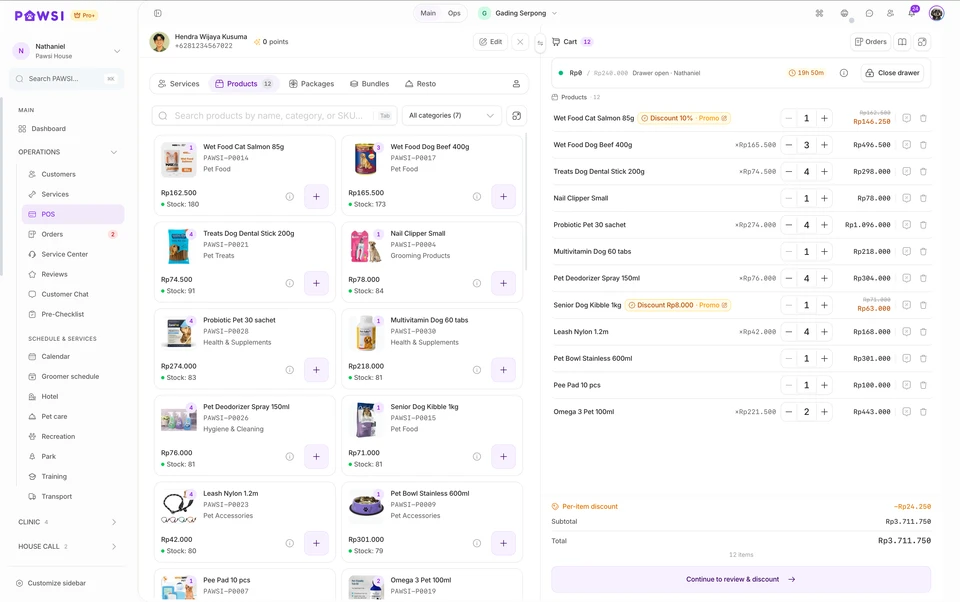
Create a supplier purchase order, then check quantities and batches when the delivery arrives.
Add products by barcode, review discounts, take payment, and send or print the receipt.
Review remaining stock, batches nearing expiry, and movement history before ordering again.
Store each product’s SKU, barcode, selling price, cost, photo, category, and minimum stock level.
Set the minimum quantity and unit price for each tier. Wholesale pricing applies automatically when the purchase quantity qualifies.
Place orders with suppliers, then record full or partial receipts based on what actually arrives.
See the received date, expiry date, remaining quantity, and cost of every batch for the same product.
Use the automatic earliest-expiry order, or move a batch that must be used first. PAWSI records the reason and warns when the order departs from FEFO.
Review products that are low in stock, nearing expiry, or already expired, including the affected quantity and supplier.
See stock moving in and out through sales, purchasing, returns, adjustments, and branch transfers.
Run a full or partial stocktake, record reasons for differences, then update stock records after review.
Open the original transaction, issue the refund, then decide whether the item returns to stock or is recorded as damaged.
Separate received goods from paid bills, then record instalment payments and the remaining purchase-order balance.
PAWSI keeps products, batches, ownership, and payout terms linked to the original supplier—even when the products are sold through the same checkout.
Set the effective period and default model: the supplier receives a base price while the store takes the markup, or the store earns a commission on the selling price.
Record the quantity, base price, and expiry date for every batch. Products remain identified as supplier-owned.
When a product sells, PAWSI links the sale to its supplier, batch, and applicable commission or markup terms.
Pull sales by supplier for a period, review the store’s share and amount due, then record payment or a dispute.
Base price and commission can follow the active agreement or be adjusted for a specific batch so settlement uses the correct terms.
Return products to the supplier or transfer consigned stock between branches without converting it into store-owned inventory.
Consignment is available as a Professional add-on and included with Pro Plus.
The PAWSI team can help map your catalogue, suppliers, purchasing, receiving, checkout, and stock control before setting up the account.
Availability depends on your plan, enabled modules, configuration and permissions.
Yes. PAWSI checkout combines retail products and pet services in one transaction, linked to the customer and pet profile.
Products and barcodes, automatic tiered wholesale pricing, suppliers, purchase orders, partial receiving, batches with expiry dates, stock movement, stocktakes, returns and branch transfers.
Yes. Inbound consignment keeps supplier-owned stock by batch and expiry, and POS sales feed supplier-period reports for settlement. It is a Professional add-on and included in Pro Plus.
Professional is Rp388.000 per month per branch and Pro Plus is Rp888.000 per month per branch. Annual billing gives 12 months for the price of 10.
Yes. Customer, pet and product data can be imported from Excel or CSV. Every paid subscription includes free standard migration help for customer, pet and product data supplied in usable files.
Professional, Pro Plus and the Home Grooming package include a 7-day free trial. After a basic business verification and a demo session, the trial starts on an agreed date. No card or advance payment is needed, and it never converts automatically.