Create the route and schedule
Choose the trip type, pickup and drop-off points, schedule, and applicable fare.

Plan trips from store to customer, customer to store, or custom routes. Vehicle calendars, driver work and photo proof live in one place.
Choose store to customer, customer to store, or a custom route. Place each stop on the map, then review the distance and total fare in one view.
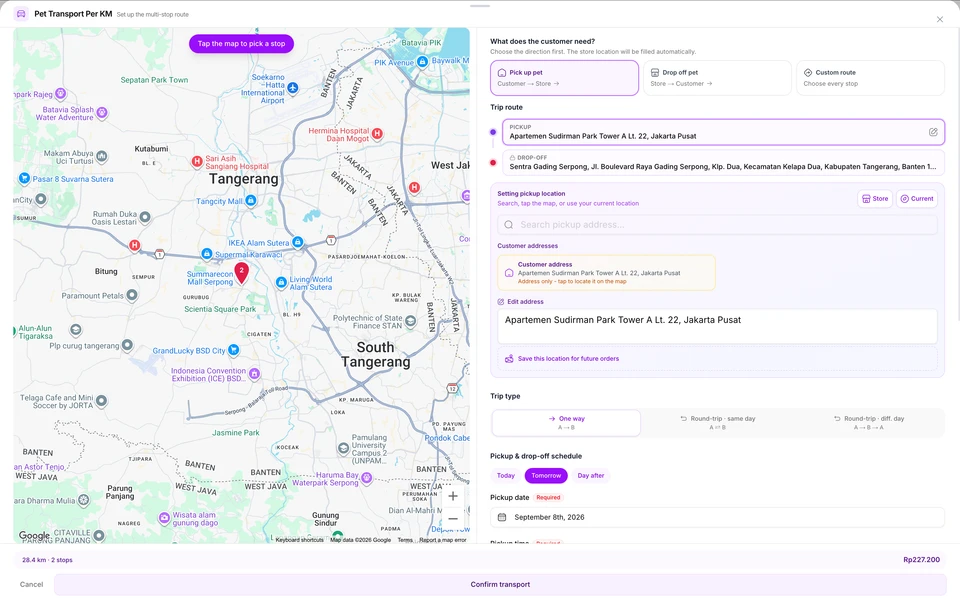
Choose the trip type, pickup and drop-off points, schedule, and applicable fare.
Check the fleet calendar, choose an available vehicle, then assign the driver handling the trip.
Open the assigned address and time, update the trip status, then save photo proof when required.
Use distance-based pricing or a fixed rate per trip. Review the distance and total fare before confirming transport.
Use store to customer, customer to store, or a custom route. Add a same-day or different-day return journey when needed.
Choose a customer address, store location, current position, or a point on the map, then save it for the next order.
View a calendar for each vehicle and every trip so dispatchers can check fleet availability.
Drag a trip to another time or vehicle without recreating its journey details.
Set up regular trips for customers. PAWSI checks scheduling conflicts before creating the recurring series.
Drivers see their assigned pickups and deliveries for the day, together with times and destination details.
Move the trip from scheduled through completion and keep photo proof with the trip record.
The PAWSI team can help map pricing, trip types, vehicles, recurring schedules, and driver responsibilities before setting up the account.
Transport is included in Professional and Pro Plus without an add-on fee.
Three route directions: store to customer, customer to store, and custom routes, including same-day or different-day returns and multi-stop routes.
Per kilometre or per trip, as your business configures.
No. Staff choose the route, schedule, vehicle and driver. PAWSI helps with vehicle calendars, drag-and-drop rescheduling and conflict detection for recurring trips.
Drivers see their assigned pickups and deliveries for the day. Trip status, photo proof and completion records stay with every trip.
No. The Transport module is included in Professional and Pro Plus.
Professional, Pro Plus and the Home Grooming package include a 7-day free trial. After a basic business verification and a demo session, the trial starts on an agreed date. No card or advance payment is needed, and it never converts automatically.